Drawing Text
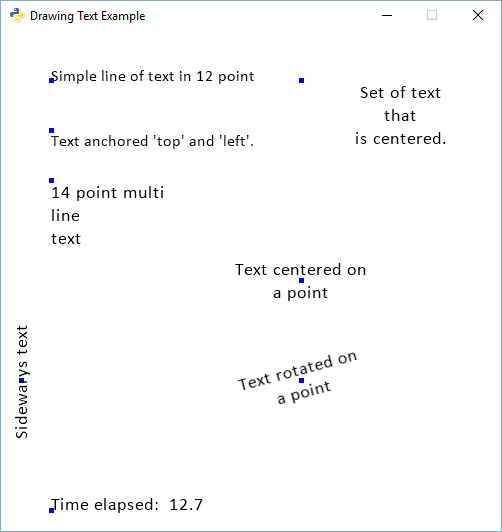
drawing_text.py
1 2 3 4 5 6 7 8 9 10 11 12 13 14 15 16 17 18 19 20 21 22 23 24 25 26 27 28 29 30 31 32 33 34 35 36 37 38 39 40 41 42 43 44 45 46 47 48 49 50 51 52 53 54 55 56 57 58 59 60 61 62 63 64 65 66 67 68 69 70 71 72 73 74 75 76 77 78 79 80 81 82 83 84 85 86 87 88 89 90 91 92 | """
Example showing how to draw text to the screen.
"""
import arcade
SCREEN_WIDTH = 500
SCREEN_HEIGHT = 500
class MyApplication(arcade.Window):
"""
Main application class.
NOTE: Go ahead and delete the methods you don't need.
If you do need a method, delete the 'pass' and replace it
with your own code. Don't leave 'pass' in this program.
"""
def __init__(self, width, height):
super().__init__(width, height, title="Drawing Text Example")
arcade.set_background_color(arcade.color.WHITE)
self.text_angle = 0
self.time_elapsed = 0
def update(self, delta_time):
self.text_angle += 1
self.time_elapsed += delta_time
def on_draw(self):
"""
Render the screen.
"""
# This command should happen before we start drawing. It will clear
# the screen to the background color, and erase what we drew last frame.
arcade.start_render()
# start_x and start_y make the start point for the text. We draw a dot to make it easy too see
# the text in relation to its start x and y.
start_x = 50
start_y = 450
arcade.draw_point(start_x, start_y, arcade.color.BLUE, 5)
arcade.draw_text("Simple line of text in 12 point", start_x, start_y, arcade.color.BLACK, 12)
start_x = 50
start_y = 400
arcade.draw_point(start_x, start_y, arcade.color.BLUE, 5)
arcade.draw_text("Text anchored 'top' and 'left'.", start_x, start_y, arcade.color.BLACK, 12,
anchor_x="left", anchor_y="top")
start_y = 350
arcade.draw_point(start_x, start_y, arcade.color.BLUE, 5)
arcade.draw_text("14 point multi\nline\ntext", start_x, start_y, arcade.color.BLACK, 14,
anchor_y="top")
start_y = 450
start_x = 300
arcade.draw_point(start_x, start_y, arcade.color.BLUE, 5)
arcade.draw_text("Set of text\nthat\nis centered.", start_x, start_y, arcade.color.BLACK, 14,
width=200, align="center", anchor_y="top")
start_y = 250
start_x = 300
arcade.draw_point(start_x, start_y, arcade.color.BLUE, 5)
arcade.draw_text("Text centered on\na point", start_x, start_y, arcade.color.BLACK, 14,
width=200, align="center",
anchor_x="center", anchor_y="center")
start_y = 150
start_x = 300
arcade.draw_point(start_x, start_y, arcade.color.BLUE, 5)
arcade.draw_text("Text rotated on\na point", start_x, start_y, arcade.color.BLACK, 14,
width=200, align="center",
anchor_x="center", anchor_y="center", rotation=self.text_angle)
start_y = 150
start_x = 20
arcade.draw_point(start_x, start_y, arcade.color.BLUE, 5)
arcade.draw_text("Sideways text", start_x, start_y, arcade.color.BLACK, 14,
width=200, align="center",
anchor_x="center", anchor_y="center", rotation=90.0)
start_y = 20
start_x = 50
arcade.draw_point(start_x, start_y, arcade.color.BLUE, 5)
arcade.draw_text("Time elapsed: {:5.1f}".format(self.time_elapsed),
start_x, start_y, arcade.color.BLACK, 14)
window = MyApplication(SCREEN_WIDTH, SCREEN_HEIGHT)
arcade.run()
|