Collect Coins that are Bouncing
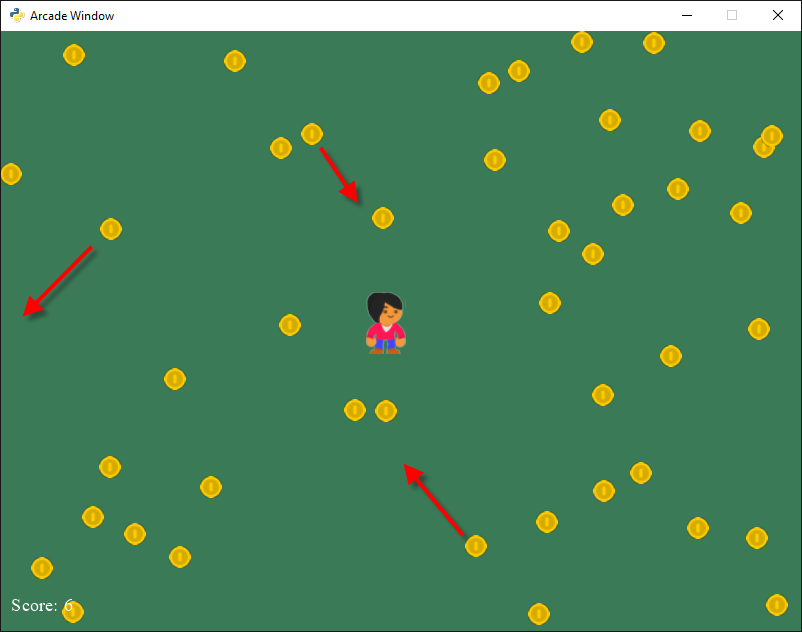
sprite_collect_coins_move_bouncing.py
1 2 3 4 5 6 7 8 9 10 11 12 13 14 15 16 17 18 19 20 21 22 23 24 25 26 27 28 29 30 31 32 33 34 35 36 37 38 39 40 41 42 43 44 45 46 47 48 49 50 51 52 53 54 55 56 57 58 59 60 61 62 63 64 65 66 67 68 69 70 71 72 73 74 75 76 77 78 79 80 81 82 83 84 85 86 87 88 89 90 91 92 93 94 95 96 97 98 99 100 101 102 103 104 105 106 107 108 109 110 111 112 113 114 115 116 117 118 119 120 121 122 123 124 125 126 127 128 129 130 131 132 133 134 135 136 137 138 139 140 141 142 143 144 145 146 147 148 149 150 151 152 153 154 155 156 157 158 159 160 161 162 163 164 165 166 167 168 169 | """
Sprite Collect Coins
Simple program to show basic sprite usage.
Artwork from http://kenney.nl
"""
import random
import arcade
SPRITE_SCALING = 0.5
SCREEN_WIDTH = 800
SCREEN_HEIGHT = 600
class Coin(arcade.Sprite):
"""
This class represents the coins on our screen. It is a child class of
the arcade library's "Sprite" class.
"""
def __init__(self, filename, sprite_scaling):
""" Constructor. """
# Call the parent class (Sprite) constructor
super().__init__(filename, sprite_scaling)
# Instance variables that control the edges of where we bounce
self.left_boundary = 0
self.right_boundary = 0
self.top_boundary = 0
self.bottom_boundary = 0
self.change_x = 0
self.change_y = 0
def update(self):
# Move the coin
self.center_x -= self.change_x
self.center_y -= self.change_y
# If we are out-of-bounds, then 'bounce'
if self.center_x < self.left_boundary:
self.change_x *= -1
if self.center_x > self.right_boundary:
self.change_x *= -1
if self.center_y < self.bottom_boundary:
self.change_y *= -1
if self.center_y > self.top_boundary:
self.change_y *= -1
class MyApplication(arcade.Window):
""" Main application class. """
def __init__(self, width, height):
"""
Initializer
:param width:
:param height:
"""
super().__init__(width, height)
# Sprite lists
self.all_sprites_list = None
self.coin_list = None
# Set up the player
self.score = 0
self.player_sprite = None
def setup(self):
""" Set up the game and initialize the variables. """
# Sprite lists
self.all_sprites_list = arcade.SpriteList()
self.coin_list = arcade.SpriteList()
# Set up the player
self.score = 0
self.player_sprite = arcade.Sprite("images/character.png",
SPRITE_SCALING)
self.player_sprite.center_x = 50
self.player_sprite.center_y = 70
self.all_sprites_list.append(self.player_sprite)
for i in range(50):
# Create the coin instance
coin = Coin("images/coin_01.png", SPRITE_SCALING / 3)
# Specify the boundaries for where a coin can be.
# Take into account that we are specifying a center x and y for the
# coin, and the coin has a size. So we can't have 0, 0 as the
# position because 3/4 of the coin would be off-screen. We have to
# start at half the width of the coin.
coin.left_boundary = coin.width // 2
coin.right_boundary = SCREEN_WIDTH - coin.width // 2
coin.bottom_boundary = coin.height // 2
coin.top_boundary = SCREEN_HEIGHT - coin.height // 2
# Create a random starting point for the coin.
coin.center_x = random.randint(coin.left_boundary,
coin.right_boundary)
coin.center_y = random.randint(coin.bottom_boundary,
coin.top_boundary)
# Create a random speed and direction.
# Note it is possible to get 0, 0 and have a coin not move at all.
coin.change_x = random.randint(-3, 3)
coin.change_y = random.randint(-3, 3)
# Add the coin to the lists
self.all_sprites_list.append(coin)
self.coin_list.append(coin)
# Don't show the mouse cursor
self.set_mouse_visible(False)
# Set the background color
arcade.set_background_color(arcade.color.AMAZON)
def on_draw(self):
"""
Render the screen.
"""
# This command has to happen before we start drawing
arcade.start_render()
# Draw all the sprites.
self.all_sprites_list.draw()
# Put the text on the screen.
output = "Score: {}".format(self.score)
arcade.draw_text(output, 10, 20, arcade.color.WHITE, 14)
def on_mouse_motion(self, x, y, dx, dy):
"""
Called whenever the mouse moves.
"""
self.player_sprite.center_x = x
self.player_sprite.center_y = y
def update(self, delta_time):
""" Movement and game logic """
# Call update on all sprites (The sprites don't do much in this
# example though.)
self.all_sprites_list.update()
# Generate a list of all sprites that collided with the player.
hit_list = \
arcade.check_for_collision_with_list(self.player_sprite,
self.coin_list)
# Loop through each colliding sprite, remove it, and add to the score.
for coin in hit_list:
coin.kill()
self.score += 1
window = MyApplication(SCREEN_WIDTH, SCREEN_HEIGHT)
window.setup()
arcade.run()
|