Work with a tiled map
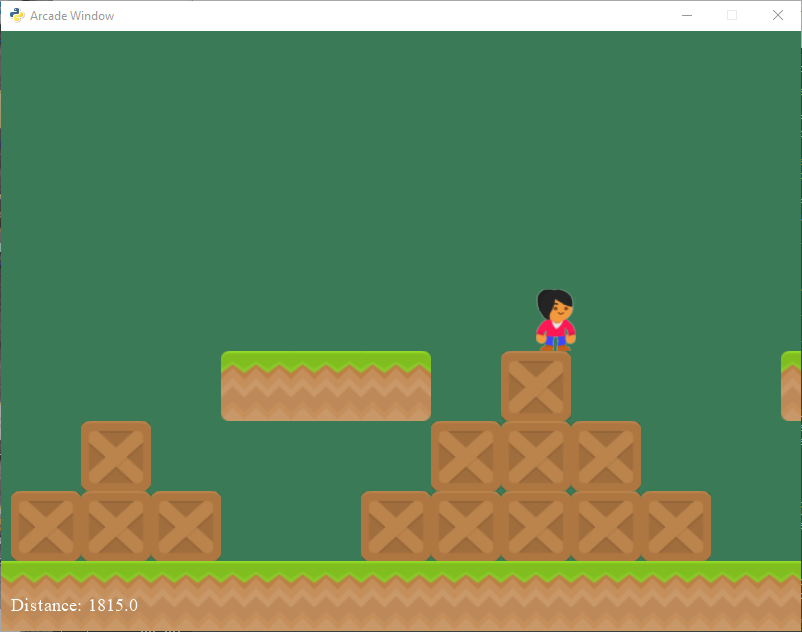
sprite_tiled_map.py
1 2 3 4 5 6 7 8 9 10 11 12 13 14 15 16 17 18 19 20 21 22 23 24 25 26 27 28 29 30 31 32 33 34 35 36 37 38 39 40 41 42 43 44 45 46 47 48 49 50 51 52 53 54 55 56 57 58 59 60 61 62 63 64 65 66 67 68 69 70 71 72 73 74 75 76 77 78 79 80 81 82 83 84 85 86 87 88 89 90 91 92 93 94 95 96 97 98 99 100 101 102 103 104 105 106 107 108 109 110 111 112 113 114 115 116 117 118 119 120 121 122 123 124 125 126 127 128 129 130 131 132 133 134 135 136 137 138 139 140 141 142 143 144 145 146 147 148 149 150 151 152 153 154 155 156 157 158 159 160 161 162 163 164 165 166 167 168 169 170 171 172 173 174 175 176 177 178 179 180 181 182 183 184 185 186 187 188 189 190 191 192 193 194 195 196 197 198 199 200 201 202 203 204 205 206 207 208 209 210 211 212 213 214 215 216 217 218 219 220 221 222 | """
Load a map stored in csv format, as exported by the program 'Tiled.'
Artwork from: http://kenney.nl
Tiled available from: http://www.mapeditor.org/
"""
import arcade
SPRITE_SCALING = 0.5
SCREEN_WIDTH = 800
SCREEN_HEIGHT = 600
# How many pixels to keep as a minimum margin between the character
# and the edge of the screen.
VIEWPORT_MARGIN = 40
RIGHT_MARGIN = 150
# Physics
MOVEMENT_SPEED = 5
JUMP_SPEED = 14
GRAVITY = 0.5
def get_map(filename):
"""
This function loads an array based on a map stored as a list of
numbers separated by commas.
"""
map_file = open(filename)
map_array = []
for line in map_file:
line = line.strip()
map_row = line.split(",")
for index, item in enumerate(map_row):
map_row[index] = int(item)
map_array.append(map_row)
return map_array
class MyApplication(arcade.Window):
""" Main application class. """
def __init__(self, width, height):
"""
Initializer
"""
super().__init__(width, height)
# Sprite lists
self.all_sprites_list = None
self.coin_list = None
# Set up the player
self.score = 0
self.player_sprite = None
self.wall_list = None
self.physics_engine = None
self.view_left = 0
self.view_bottom = 0
self.game_over = False
def setup(self):
""" Set up the game and initialize the variables. """
# Sprite lists
self.all_sprites_list = arcade.SpriteList()
self.wall_list = arcade.SpriteList()
# Set up the player
self.score = 0
self.player_sprite = arcade.Sprite("images/character.png",
SPRITE_SCALING)
# Starting position of the player
self.player_sprite.center_x = 64
self.player_sprite.center_y = 270
self.all_sprites_list.append(self.player_sprite)
# Get a 2D array made of numbers based on the map
map_array = get_map("map.csv")
for row_index, row in enumerate(map_array):
for column_index, item in enumerate(row):
# For this map, the numbers represent:
# -1 = empty
# 0 = box
# 1 = grass left edge
# 2 = grass middle
# 3 = grass right edge
if item == -1:
continue
elif item == 0:
wall = arcade.Sprite("images/boxCrate_double.png",
SPRITE_SCALING)
elif item == 1:
wall = arcade.Sprite("images/grassLeft.png",
SPRITE_SCALING)
elif item == 2:
wall = arcade.Sprite("images/grassMid.png",
SPRITE_SCALING)
elif item == 3:
wall = arcade.Sprite("images/grassRight.png",
SPRITE_SCALING)
wall.right = column_index * 64
wall.top = (7 - row_index) * 64
self.all_sprites_list.append(wall)
self.wall_list.append(wall)
self.physics_engine = \
arcade.PhysicsEnginePlatformer(self.player_sprite,
self.wall_list,
gravity_constant=GRAVITY)
# Set the background color
arcade.set_background_color(arcade.color.AMAZON)
# Set the view port boundaries
# These numbers set where we have 'scrolled' to.
self.view_left = 0
self.view_bottom = 0
self.game_over = False
def on_draw(self):
"""
Render the screen.
"""
# This command has to happen before we start drawing
arcade.start_render()
# Draw all the sprites.
self.all_sprites_list.draw()
# Put the text on the screen.
# Adjust the text position based on the view port so that we don't
# scroll the text too.
distance = self.view_left + self.player_sprite.right
output = "Distance: {}".format(distance)
arcade.draw_text(output, self.view_left + 10, self.view_bottom + 20,
arcade.color.WHITE, 14)
if self.game_over:
output = "Game Over"
arcade.draw_text(output, self.view_left + 200,
self.view_bottom + 200,
arcade.color.WHITE, 30)
def on_key_press(self, key, modifiers):
"""
Called whenever the mouse moves.
"""
if key == arcade.key.UP:
if self.physics_engine.can_jump():
self.player_sprite.change_y = JUMP_SPEED
elif key == arcade.key.LEFT:
self.player_sprite.change_x = -MOVEMENT_SPEED
elif key == arcade.key.RIGHT:
self.player_sprite.change_x = MOVEMENT_SPEED
def on_key_release(self, key, modifiers):
"""
Called when the user presses a mouse button.
"""
if key == arcade.key.LEFT or key == arcade.key.RIGHT:
self.player_sprite.change_x = 0
def update(self, delta_time):
""" Movement and game logic """
if self.view_left + self.player_sprite.right >= 5630:
self.game_over = True
# Call update on all sprites (The sprites don't do much in this
# example though.)
if not self.game_over:
self.physics_engine.update()
# --- Manage Scrolling ---
# Track if we need to change the view port
changed = False
# Scroll left
left_bndry = self.view_left + VIEWPORT_MARGIN
if self.player_sprite.left < left_bndry:
self.view_left -= left_bndry - self.player_sprite.left
changed = True
# Scroll right
right_bndry = self.view_left + SCREEN_WIDTH - RIGHT_MARGIN
if self.player_sprite.right > right_bndry:
self.view_left += self.player_sprite.right - right_bndry
changed = True
# Scroll up
top_bndry = self.view_bottom + SCREEN_HEIGHT - VIEWPORT_MARGIN
if self.player_sprite.top > top_bndry:
self.view_bottom += self.player_sprite.top - top_bndry
changed = True
# Scroll down
bottom_bndry = self.view_bottom + VIEWPORT_MARGIN
if self.player_sprite.bottom < bottom_bndry:
self.view_bottom -= bottom_bndry - self.player_sprite.bottom
changed = True
# If we need to scroll, go ahead and do it.
if changed:
arcade.set_viewport(self.view_left,
SCREEN_WIDTH + self.view_left,
self.view_bottom,
SCREEN_HEIGHT + self.view_bottom)
window = MyApplication(SCREEN_WIDTH, SCREEN_HEIGHT)
window.setup()
arcade.run()
|